
With Instant Color Picker (ICP), you can quickly pick colors from screen and store them. Here are some screenshots.
Color Palette
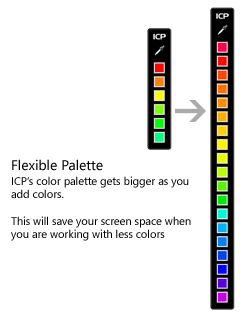
ICP’s color palette can store up to 20 colors. It resizes itselft according to the number of colors in it. You can also:
Copy color values
Copy or export palette as an image
Export palette as a Photoshop ACO file
Reorder colors
Paste various color values
Make colors web safe
And more…
Advanced Eye Dropper
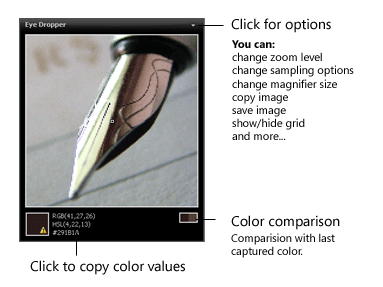
Zoom up to 8x. Get average of 9 or 25 pixels. Can’t select the right pixel? Need to pick multiple colors? You can also use navigation keys to move around!
You can:
Zoom up to 8x
Get single pixel, 3×3 or 5×5 averages
Use navigation keys to make precise selections
Copy or export image (BMP, PNG, GIF)
Copy color values in one click
Display various color formats or create your own
Compare current color with last captured color
Make magnification area smaller or bigger
Show/Hide grid
And more.
Color Properties


Using auto copy feature, you can copy a color value only in one step: Just press the global hotkey and color values of the color under the mouse pointer will be copied to the clipboard. To use this color under another program, like Adobe Photoshop or Adobe Flash, you just need to paste it!
Quick Color Palette
You can copy color values in different formats including RGB, HSL, HSV, CMYK, HTML Hex, ActionScript, Delphi , VC++ and VB. You can also copy and save colors as images (color swatches). Need a special format? You can create your own color formats!
Test Layouts
Yes, you can paste colors, and it is not limited to Hex values! ICP can understand color values in RGB, HSL, HTML Hex, ActionScript, Delphi , VC++ and VB formats!
Copy Color Values
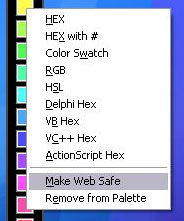
Copy color values in different formats including color swatches.
Copy HTML tags
Use HTML Quick Reference to copy HTML tags.
Global Hotkey
Set the key combination to bring ICP to front.
Auto Copy
Copy every color you selected, instantly.
And more!
ICP has more features to discover!
This site was developed with help from www.nolimitmedia.com and Prime Business Solutions